Posts

Showing posts from March, 2009

PHP Advanced Database Class

i found this class very useful for php mysql development. you can use this class to sped up your php development. usualy if you want to make a query to a table in your database you need to: make the connection to database add the query (eg. $sql = select * from table) add the ($result = mysql_query($sql)) line then (while($row = mysq_fetch_array($result)){….}) now when you use this class, you do it like this:   // Include the class: include("db.class.php"); // Open the base (construct the object): $db = new DB($base, $server, $user, $pass); // Commonly, you can copy/paste this code for one query at a time: $db->query("SELECT * FROM People"); while ($line = $db->fetchNextObject()) {   use($line->aField); } although you can use $db->query("SELECT * FROM People",true); this will enable debug mode, so if there is an error you will got a help on your error. for more in...
SQL Maestro for MySQL v8.3

Image
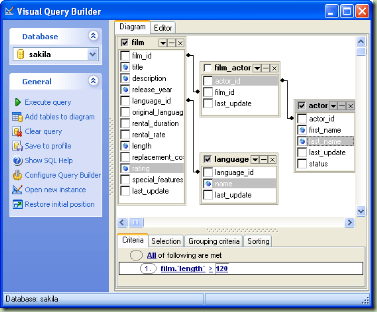
SQL Maestro for MySQL is the premier MySQL admin tool for database management, control and development. Key features include: Easy database object management Database Designer Data management: viewing, editing, grouping, sorting and filtering abilities Handy SQL Editor with code folding, syntax highlighting, and multi-threading Visual Query Builder Possibility to connect to remote servers via SSH or HTTP tunnel Data export/import to/from the most popular formats Powerful BLOB Viewer/Editor The application also provides you with a powerful set of tools to edit and execute SQL scripts, build visual diagrams for numeric data, compose OLAP cubes, and much more. Easy installation and intuitive interface in combination with support of all the MySQL latest features make it an irreplaceable tool for MySQL on the web or at your local desktop. SQL Maestro for MySQL provides an ability to manage queries in the same way as if they were database objects. ...

30 Google Chrome tips, tricks and shortcuts

1. Create desktop and Start menu shortcuts to web apps such as Gmail - go to Gmail.com and then select Create application shortcuts... from the Page Control menu (in the top-right corner of your browser - it looks like a page with the corner folded over). Now choose where you want to place your shortcut. This works for other Google apps such as Calendar and Documents, and other services such as Windows Live Hotmail. 2. Control + Shift + N opens an 'incognito' window - sites you view in this window won't appear in your history and cookies served by sites in this window will be deleted when the window is closed. 3. You can open a link in an incognito window by right-clicking the link and selecting Open link in incognito window . 4. Alt + Home loads your Google Chrome home page, with thumbnails of your most visited sites shown in the active tabbed window. 5. Control + T opens a new tab. You can drag tabs around to change their order or drag a tab out of the window...

10 ways to make Chrome as good as Firefox - How to get the best Firefox features in Chrome today

i have found this article interesting from http://www.techradar.com The Google Chrome browser is designed to be lightweight in comparison to what it perceives are bloated offerings from Microsoft and Mozilla among others. For some, however, it's too lightweight. So if you've put off switching due to Chrome lacking key features that you've come to rely on in other web browsers, then read on to discover 10 easy ways you can plug the functionality gap. 1. Enhance RSS support Want to detect RSS feeds in Chrome and then subscribe to them through a third-party reader? Browse to savanttools.com/feedhelp-bookmarklet.asp and drag the 'Detect Feed' link on to your Bookmarks toolbar. Click this on any page with a RSS feed and you can then easily subscribe to the feed through one of nine supported readers, including Google Reader, Newsgator and iTunes. 2. Secure passwords manager Chrome doesn't encrypt your saved passwords; neither does it provide a maste...

PHP designer 2008 6.2.4

Image
phpDesigner 2008 is your PHP IDE and PHP editor for all your PHP and Web development with support for PHP object-oriented programming, PHP frameworks, debug with Xdebug, remote ftp-editing and hundreds other cool features! Introduction phpDesigner 2008 is today's PHP IDE and PHP editor - the complete integrated development environment for PHP for both beginners and professional developers that help you boost the process of editing, analyzing, debugging and publishing applications and websites powered by PHP and other web languages! Boost your productivity phpDesigner 2008 is designed to boost your productivity and simplify complex coding projects through intelligent set of editing tools that includes full support for PHP4/PHP5, syntax highlighters, highlighting of matching tags/braces and numerous tools and wizards to speed of your development! Intelligent syntax highlighting The intelligent syntax highlighter in php...